01
Rust core
文档、几何、命令、渲染的唯一权威。UI 和渲染都是派生。 The single authority for documents, geometry, commands, and rendering. UI and rendering are derived.
Open-source CAD · 早期预览 Open-source CAD · Early preview
一个核心,多种载体。 One core. Every surface.
Rust 核心负责 DWG/DXF 文档、几何、命令与 wgpu 渲染;React + Tauri 负责界面。一个核心,多种载体。 The Rust core owns DWG/DXF documents, geometry, commands, and wgpu rendering. React and Tauri handle the interface. One core, many surfaces.
项目仍在早期开发,尚无可交付产品。Linux/Wayland 是当前主开发目标,支持最完整;Android APK 已由维护者侧载运行。其他载体的运行时证据边界见下方平台卡片。 The project is still in early development and there is no shippable product yet. Linux/Wayland is the primary development target with the strongest support; the Android APK has been sideloaded and run by the maintainer. Runtime evidence boundaries for the other surfaces are in the platform cards below.
223/981
条命令有实现路径commands with an implementation path
50 完整 + 173 部分 · 清单计数,不是兼容率 50 complete + 173 partial · list count, not a compatibility rate
DWG+DXF
读取 / 解析read / parse
DWG 兼容性未验收DWG compatibility is not verified
Rust+wgpu
核心与渲染core and renderer
现代 GPU 特性 · 72 万图元测试图纸modern GPU features · 725K-entity test drawing
5
种载体surfaces
Linux / Windows / macOS / Android / Web
实机截图Real screenshot
下面这张是 yacr 桌面程序在 Linux 原生 Wayland 会话里的真实截图:上方是 React + Tauri 界面,中间由 Rust 核心和 wgpu 绘制,底部是文件标签、命令行与状态栏。 A real screenshot of the yacr desktop app in a native Wayland session on Linux: React + Tauri chrome on top, drawing driven by the Rust core and wgpu, with the file tab, command line, and status bar below.
qcad-flange/flange.dxf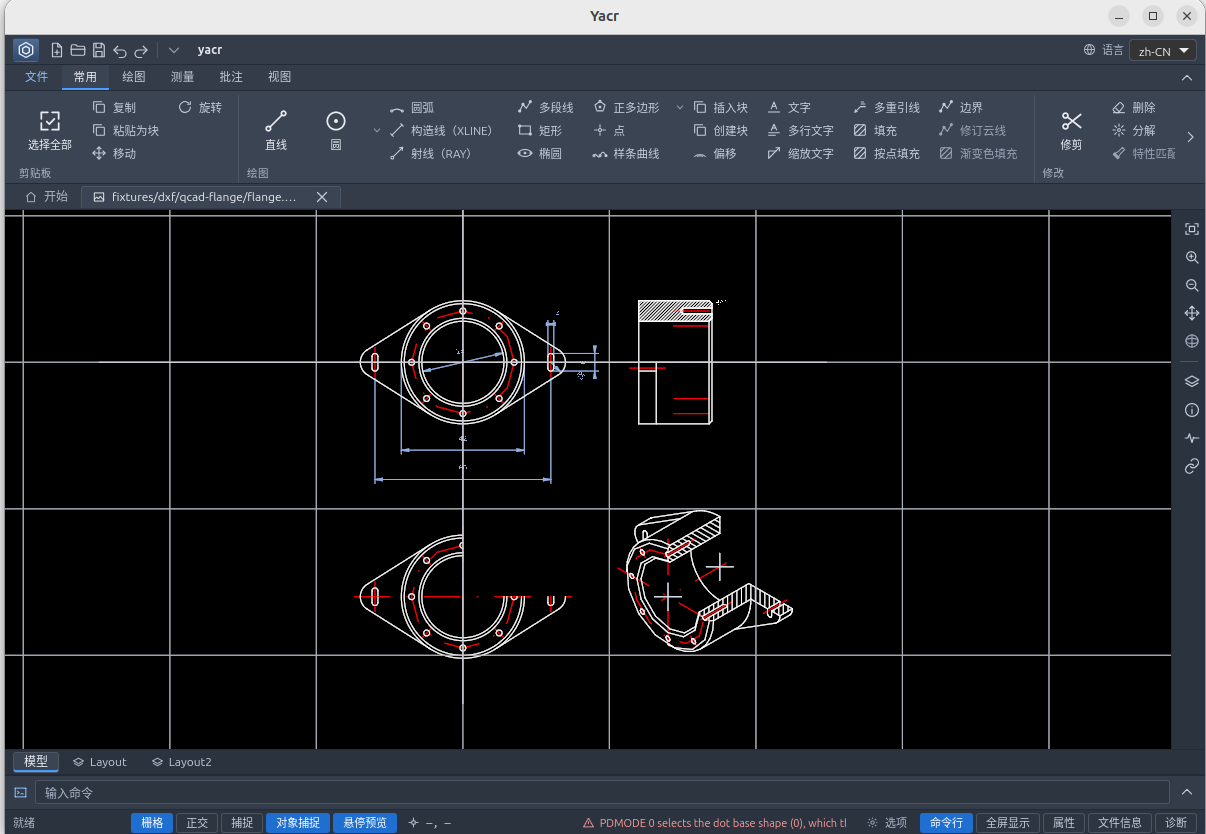
真实截图:Linux 原生 Wayland 会话中的 yacr,通过 React / Tauri 界面打开 fixtures/dxf/qcad-flange/flange.dxf。黑色画布上是法兰的二维视图,顶部是功能区与文件标签,底部是命令行与状态栏。
A real screenshot: yacr in a native Wayland session on Linux, with fixtures/dxf/qcad-flange/flange.dxf open in the React / Tauri interface. The flange’s 2D views sit on the black canvas, below the ribbon and file tab and above the command line and status bar.
223/981
条命令有实现路径commands with an implementation path
DWG·DXF
导入import
wgpu·Vulkan
渲染器renderer
725K
图元(复杂测试图纸展开)entities (expanded large test drawing)
01架构Architecture
yacr 的文档、几何、命令和渲染核心是 Rust;界面是 React + TypeScript,运行在 Tauri WebView 中。不是 100% pure Rust,这是为了“一棵 React 树,多种载体”的有意取舍。 yacr’s document, geometry, command, and rendering core is Rust. The interface is React + TypeScript running inside a Tauri WebView. It is not 100% pure Rust — a deliberate trade-off for one React tree across many surfaces.
cad-dbgeometrycommandswgpu
cad-hostcad-ui-core
ReactTypeScriptWebView
LinuxWindowsmacOSAndroidWeb
01
文档、几何、命令、渲染的唯一权威。UI 和渲染都是派生。 The single authority for documents, geometry, commands, and rendering. UI and rendering are derived.
02
同一棵 React 树覆盖桌面与移动,按宽度切换,不按构建目标分叉。 One React tree covers desktop and mobile, switching by width rather than by build target.
03
native-below 用原生会话,dom-canvas 用 wasm 会话;两条路径各自持有文档。 Native sessions for native-below; wasm sessions for dom-canvas. Each path owns its document.
Linux Wayland · Windows · macOS · Android
native 会话持有 cad-db。透明 WebView 在上,原生 CAD surface 在下。
The native session owns cad-db. A transparent WebView sits above the native CAD surface.
X11 / XWayland · Web
wasm 会话持有 cad-db,CAD 画在 DOM <canvas> 上。
The wasm session owns cad-db; CAD is drawn on a DOM <canvas>.
不是同一份文档状态在两边共享。共享的是契约与 UI,不是数据;另一侧不得实例化第二份文档状态。 The same document state is not shared across both. Contracts and UI are shared; data is not. Neither side may instantiate a second document state.
02功能Capabilities
从导入、数据库、渲染到测量与命令覆盖,每张卡片都写明能力边界。 From import and the database to rendering, measurement, and command coverage — every card states its boundary.
acadrust 0.6.8(未修改)。DWG 与 DXF ASCII/二进制导入,异步导入、进度与取消。这里不宣称已验证的兼容矩阵。
acadrust 0.6.8, unmodified. DWG and DXF ASCII/binary import with asynchronous loading, progress, and cancel. No verified compatibility matrix is claimed.
cad-db 持有文档;写入走事务与 ChangeSet,依赖失效后只重建受影响的显示表示。不重解析底图。
cad-db owns the document. Writes go through transactions and ChangeSet; dependency invalidation rebuilds only the affected display representations. The source drawing is not re-parsed.
Rust + wgpu 使用现代 GPU 特性;批处理、导航 LOD、VRAM 预检。测试图纸展开后约 72 万图元,已在真实 GPU 宿主上打开并渲染;性能验收仍未完成。渲染是派生,不反向成为数据源。 Rust + wgpu uses modern GPU features: batching, navigation LOD, and VRAM preflight. Test drawings expand to roughly 725K entities and open and render on a real GPU host; performance acceptance is still pending. Rendering is derived and never becomes the data source.
距离、折线长度、角度、面积;单位、精度与几何来源可追溯。 Distance, polyline length, angle, and area — with traceable units, precision, and geometry provenance.
223 条有实现路径(50 完整 + 173 部分),758 条未实现。未支持的选项按名拒绝,不静默成功。 223 commands have an implementation path (50 complete + 173 partial); 758 are not implemented. Unsupported options are rejected by name, never silently accepted.
桌面与移动共用同一 UI,按宽度切换。Android 也是 native-below,不按构建目标把 CAD 命令送到 wasm。
Desktop and mobile share one UI, switching by width. Android is also native-below; CAD commands are not routed to wasm by build target.
plugins/tch(tangent-ts)作为 git submodule 接入,负责天正/TCH 图元与 proxy graphics 显示;插件 bundle 进入所有载体产物。插件管理器状态持久化,vendor 实体可被选择并显示属性行。
plugins/tch (tangent-ts) is wired as a git submodule and handles Tianzheng/TCH entities and proxy-graphics display. The plugin bundle ships in every carrier. Plugin-manager state persists, and vendor entities can be selected with property rows.
无 proxy graphics 缓存时不显示;这不是 AutoCAD 兼容性声明。 No cached proxy graphics means no display; this is not an AutoCAD compatibility claim.
03工作流Workflow
查看与测量是主线;保存与出图各有明确的格式边界。 Viewing and measuring are the main line. Saving and output each have explicit format boundaries.
本地打开 DWG/DXF,或在 Web 版直接上传文件。 Open DWG/DXF locally, or upload a file directly in the web app.
DWG · DXF · UPLOAD平移、缩放、FIT、图层、选择与属性查看。 Pan, zoom, FIT, layers, selection, and properties.
PAN · ZOOM · FIT · LAYERSRibbon 或经典菜单栏、命令历史,以及五个可浮动面板。 Ribbon or classic menu bar, command history, and five floatable panels.
RIBBON · HISTORY · PANELSDXF 另存(有损)、实验性新 DWG 导出、PNG/SVG/PDF(CLI/Web)。 Lossy DXF Save As, experimental new-DWG export, and PNG/SVG/PDF (CLI/web).
没有 DWG 原地回写No in-place DWG writeback04平台Platforms
状态按仓库当前证据边界标注,不等于产品验收。Linux/Wayland 是主开发目标;Android APK 已由维护者侧载运行;Windows/macOS 是真实宿主,运行时仍待验收。 Status reflects the evidence currently in the repository; it is not product acceptance. Linux/Wayland is the primary development target; the Android APK has been sideloaded by the maintainer; Windows/macOS are real hosts whose runtime still needs acceptance.
native-below · Wayland / dom-canvas · X11
原生 Wayland 走 native-below,X11/XWayland 走 dom-canvas。Flatpak 分发;当前主开发目标,Wayland 支持最完整。 Native Wayland uses native-below; X11/XWayland uses dom-canvas. Distributed as Flatpak — the primary development target, with the strongest Wayland support.
scale=1Bounded evidence: GNOME/Mutter + P620 + scale=1dom-canvas · wasm CadSession
wasm CadSession + DOM canvas。OPEN 走页面上传;SAVE/PLOT 走浏览器下载(DXF/SVG/PDF),不回写 DWG。
wasm CadSession + DOM canvas. OPEN uses an in-page upload; SAVE/PLOT uses browser downloads (DXF/SVG/PDF) and never writes DWG back.
native-below · Win32 child HWND
真实 Tauri/WebView2 加 Win32 child HWND。缺少 WebView2 时以退出码 5 拒绝。 Real Tauri/WebView2 with a Win32 child HWND. Refuses with exit code 5 when WebView2 is missing.
native-below · WKWebView + NSView
真实 Tauri/WKWebView 加 CAD 子 NSView(Metal)。
Real Tauri/WKWebView with a CAD child NSView (Metal).
native-below · Vulkan SurfaceView
Tauri WebView + 原生 CadSession + Vulkan SurfaceView;wasm 会话不实例化。SAF 打开与 DXF 导出已接线,DWG 保存显式延后。维护者已侧载 APK 并运行成功。
Tauri WebView + native CadSession + Vulkan SurfaceView; the wasm session is not instantiated. SAF open and DXF export are wired; DWG save is explicitly deferred. The maintainer has sideloaded the APK and run it successfully.
05下载Download
主按钮走 Cloudflare R2 国内镜像;GitHub Release 作为上游与校验来源。若 CDN 未配置,自动回退 GitHub。 Primary buttons use the Cloudflare R2 mirror for mainland China. GitHub Releases remain the upstream source and checksum reference. If the CDN is not configured, links fall back to GitHub automatically.
GitHub 在国内可能无法访问,优先使用 Cloudflare 镜像;镜像文件与上游 Release 同名,可用 SHA-256 校验。 GitHub may be unreachable from mainland China, so prefer the Cloudflare mirror. Mirror files keep the upstream Release filenames and can be verified with SHA-256.
yacr-0.1.5-linux-x86_64.flatpak
105,454,832 bytes · ≈ 100.6 MiB
org.gnome.Platform//51Flatpak; requires org.gnome.Platform//51io.github.zenglanmu.yacrapp id io.github.zenglanmu.yacr.sha256 与 .flatpak.gpgShips with .sha256 and .flatpak.gpgflatpak install --user yacr-0.1.5-linux-x86_64.flatpak
flatpak run io.github.zenglanmu.yacr
yacr-0.1.5-windows-x86_64.zip
84,979,826 bytes · ≈ 81.0 MiB
bin/yacr-windows.exeUnzip and run bin/yacr-windows.exebin\yacr-windows.exeyacr-0.1.5-macos-universal.tar.gz
114,179,356 bytes · ≈ 108.9 MiB
xattr -dr com.apple.quarantine Yacr.app
app-universal-release.apk
91,887,073 bytes · ≈ 87.6 MiB
adb install -r app-universal-release.apk
校验与签名说明: Checksums and signing notes:
SIGNING.txt .flatpak.gpg GitHub Release 所有 SHA-256 均指向上游 GitHub。 All SHA-256 links point to upstream GitHub.06常见问题FAQ
关于许可、成熟度、技术取舍与下载的边界,都在这里。 Licensing, maturity, technical trade-offs, and download boundaries — answered without hedging.
还有问题?去 GitHub IssuesStill curious? Open a GitHub issue是。yacr 以 AGPL-3.0 发布,源码公开在 GitHub。没有付费版本,也没有被锁住的导出功能。 Yes. yacr is released under AGPL-3.0 and the source is public on GitHub. There is no paid tier and no locked export feature.
不能。项目仍在早期开发,尚无可交付产品。Linux/Wayland 是主开发目标,Android APK 已由维护者侧载运行;Windows、macOS、Web 的运行时证据边界见上方平台卡片,均不等于验收。 No. The project is still in early development and there is no shippable product. Linux/Wayland is the primary development target and the Android APK has been sideloaded by the maintainer. The runtime evidence boundaries for Windows, macOS, and the Web are listed in the platform cards above; none of them equals acceptance.
因为界面要覆盖桌面、移动与 Web。一棵 React 树可以由同一套组件和布局规则驱动,Rust 核心继续作为唯一数据源。代价是它不是 100% pure Rust;这是有意的取舍,不是遗漏。 Because the interface has to cover desktop, mobile, and the web. One React tree can be driven by the same components and layout rules while the Rust core remains the single data source. The cost is that this is not 100% pure Rust — a deliberate trade-off, not an oversight.
没有 DWG 原地回写。SAVE 目前是有损 DXF 另存;源文件是 DWG 时,会写出一个实验性的新 DWG 文件,而不是覆盖原文件。
There is no in-place DWG writeback. SAVE is a lossy DXF Save As today; when the source is DWG, it writes an experimental new DWG file instead of overwriting the original.
它是命令清单的计数:981 条命令中 223 条有实现路径(50 完整 + 173 部分),758 条未实现。它不是 AutoCAD 兼容率;未支持的选项会按名称拒绝,不会静默成功。 It is a count of the command list: of 981 commands, 223 have an implementation path (50 complete + 173 partial) and 758 are not implemented. It is not an AutoCAD compatibility rate. Unsupported options are rejected by name, never silently accepted.
优先使用 Cloudflare R2 镜像;GitHub Release 是上游与校验来源。镜像文件与上游同名,下载后用 .sha256 校验即可。若 CDN 未配置,下载按钮会自动回退到 GitHub。
Prefer the Cloudflare R2 mirror; GitHub Releases are the upstream and checksum source. Mirror files keep the upstream filenames — verify them with the .sha256 file after downloading. If the CDN is not configured, buttons fall back to GitHub automatically.